skip to main |
skip to sidebar
 Don't you just learning new things, I DO!! I had always seen these little orange icons on websites I frequent. I wasn't quite sure what they are, but now I know!! They are RSS Feeds and they allow you to collect all your websites, blogs, news, etc into a reader. No more checking out 10 different websites, it's all there for you. Like a Google tutorial said, "It's an inbox for the web". And I love it!!!I decided to go with Google reader. As you know I love Google and I thought it would be much easier to keep track of all my new learning tools if I kept them all in the same place. Here are the items listed on my reader, I hope you enjoy them as much as I do!Thing #8 Excercise:Q:What do you like about RSS and newsreaders?
- I love that everything is right at my fingertips. I am becoming a blog junkie. I love that I can put all of my favorite blogs in one spot and read them when I'm ready. No more having to go surf through 10 different blogs. I also like that I can add them to folders. The more organized you are, the easier it is to find the things you are looking for!
Q: How do you think you might be able to use this technology in your school or personal life?- In my personal life, I will be able to skim through my favorite sites quickly. As far as school goes, I'm not quite in the classroom yet, but I think this will help me keep a step in the latest trends. I know life as a teacher is busy, busy, busy, so this will definitely come in handy once I'm in the classroom, so I can stay up to date with my teacher friends.
Q:How can libraries use RSS or take advantage of this new technology?- They can keep themselves and students up to date all in one spot. I was thinking this is also good because the teacher can limit what to share with students. Say for instance the teacher is signed up for a news group and she shares her reader with her students, if an article is not appropriate for the classroom, she can just remove it.
I know I will be using RSS feeds and readers! My question is - how do I add a RSS feed to my classroom website. How cool would it be for parents to get news from the classroom through their readers, vs having to go through and check the different links to my website. :) Pretty nifty! (BTW this is on my list of things I want to learn)
I love GOOGLE!! It is by far the webpage I visit the most. What I love even more are the extra tools Google offers. I tested out Google Notebooks. GN allows you to save links and info into one spot. I love this tool!! What I usually do is just create folders on my computer and try to put a great description for the file name. I love how you can add labels so you can find things easier in GN. The only thing that I wish it had the capability was to save images. I know I could just list links, but I've run into trouble by just bookmarking and saving links. (I love to search the web for ideas for my future classroom. I had hundreds of teachers website bookmarked with tons of great information. I lost a lot of this great info because the teacher no longer has their website going!) I would suggest if you do use Google notebook to copy and paste all of the information your are wanting to keep and not just links. So for my first notebook I created one for all of my safari theme ideas. I was able to create labels such as "bulletin boards", so that I can easily find all of my notes on that subject. Here is my safari notebook. There are so many possibilities with this tool. Students could use it when doing research projects to keep track of all of their resources. It's great for teachers to keep track of ideas or themes within the classroom. I love this tool and I know I will use it in my classroom!Another tool that I hadn't heard about was Google Docs. This tool has several templates for many common documents you use everyday. Some great ones I found while looking through it where attendance and grade books. There are so many templates that students and teachers can use. Very cool!!!
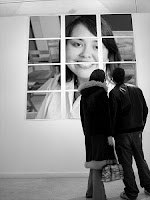 WOW!! Who knew all of this stuff was out there!! Too much fun!So a few of my favorites:musuemr - you can take an image and make it look like people are at the museum looking at it. This would be great for a bulletin board, maybe student of the week. Also could be used for colleagues or someone retiring. Would make a cute send off card!Mappr - Allows you to put pictures on a map. There are so many things you can do with this one. Maybe a geography project and the students put images of famous sites on the map. Or maybe it's a travel map where the kids can show places they've been.Trading Card Maker - Wouldn't this be a cool tool for kids to use during an autobiography project or a author study. They have to create a trading card with the author and let everyone know about them in a trading card.I'm truly enjoying this adventure. I apologize for all of the post being in the same night, but the deadline is a few days from now and I want to finish before then. I just wish I had found this program before tonight :)
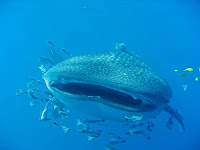 I had heard about flickr, but had never really used it before. In my comic book class that I recently taught, I allowed the students to use images from Google images. I know have another resource to use that allows for the correct way to use images. I will also be teaching my students the importance of abiding by copyright laws.I found so many amazing pictures, but what a great resource for teachers. I did a search on classroom libraries and found some wonderful pictures and great ideas!!! In the spirit of "Shark Week", I wanted a picture of a shark. I found this fabulous picture. The person who took it ran into it while snorkeling - can you imagine? What a beautiful image. I love Shark Week!! I get so excited when I start seeing the commercials for it. Of course I've been watching it all week :) I have been catching for at least the past 13 years. I think this is it's 21st year on the air. AMAZING!! So far my favorite has been Cash Cab - Shark Week and Survivor - Shark Week.
I have my blog up and going now. I also created a new avatar - isn't she cute!!! That was so much fun! I recently cut my hair, this was the closest thing I could come to it :)
Even though I already had my blog set up, I learned quite a few new things about blogs that I didn't already know.
I have decided to play along with the Library2Play of 23 things to learn. So far it has been very interesting and I am very excited to participate. Come play along with me!Thing#2The hardest of the goals for me is to begin with an end in mind. I'm a very creative person and my mind goes a million miles a minute at all times. When I come up with something new I want to learn, or something I want to create, I get overwhelmed because I start thinking about 200 other things I want to learn or create. It's very hard for me to focus on just one thing! Have you ever seen that Gwen Stefani commercial (I think it's HP) she has all these pictures flying around her and it's what she says is constantly going through her mind, that me!!The easiest habit for me is teaching and mentoring. I had already created a blog before beginning this journey, but I created it to share so that others can learn from me. I love teaching others!! And I firmly believe as the video stated, "the best way to learn something is to teach someone else." I also think that using technology comes very easy to me. I am very attached to my computer and the internet. So much so that everyone in my family call me first when they need to research something whether it be deals for Disneyland or to look up medical symptoms they are having.
 Last night had to be marked down as one of my best days ever. Of course my wedding and the birth of my children top that list, but last night was so wonderful that it is pretty high on the list.I have been holding a class at the public library since June. I wanted to teach kids computer skills, but do it in a creative and fun way. After seeing Iron Man earlier in the summer, I came up with the perfect idea! I would have a comic book class. I would have the kids use the computers to create comics (and other small projects) while learning valuable computer skills. It was a total volunteer type thing. The kids weren't signed up for the class and they weren't forced into it by their parents, it was totally on their part to decide to come and stick with the class. My job was to not only teach them computer skills, but to keep them in the class and coming back. It was a tough challenge, as I was competing against other fun summer activities such as swimming, hanging with friends, myspace, wii, etc. Well I DID it!! I originally was holding the class 2 days a week, and teaching different "lessons" on each day. Well I had such a huge turnout of kids that I finally had the split the class and make it the same lesson on both nights so more kids could attend. It is such an indescribable feeling when you know you have captivated children and have triumphed over other things such as gaming systems and the internet.So I've been holding the the class for about 2 months now. The kids created superheros, trading cards, manipulated pictures, changed their picture into a comic, and wrote and illustrated their very own comic book - all on the computer. They worked super hard and I was so very proud of them. Last night we celebrated their accomplishments with a comic book release party. It was fabulous!! I showed a movie I made of the kids working hard and their finished projects. Then I presented them with the completed comic they wrote. Most of the kids were low SES, and several had mentioned that they didn't have school supplies for the upcoming year. I solicited donations from my school, friends, family and area businesses. I was able to get each kids a backpack filled with most of the items on their supply list. What made it the best day ever? Their faces when they got their completed comic books and backpacks. Their eyes were huge and their smiles even bigger. They were so happy!! What an amazing feeling!! I know I made a difference in these children - some have told me they want to write books when they grow up others want to work with computers; and one even wants to write comics! From this class I know that I'm exactly where I'm supposed to be and doing exactly what I am supposed to be doing - I'm a teacher!!Just as I think it can't get any better. The coordinator over the youth services of all of the libraries here, wants to take my class and host it at other locations. He also wants me to be involved in a new program that they just received a grant for which will involve taking laptops around and working with kids! I love it and I'm so excited for the future opportunities! So yesterday was the BEST DAY EVER!!!


 Posts
Posts


